Woo Commerce’s backend allows users to view and manage orders. Upon entering Woo Commerce > Orders, you will find individual transactions with different order statuses. Order statuses let you know how far along the order is, starting with “Pending payment” and ending with “Completed.” The following order statuses are used:
- Pending payment — Order received, no payment initiated. Awaiting payment (unpaid).
- Failed — Payment failed or was declined (unpaid) or requires authentication (SCA). Note that this status may not show immediately and instead show as Pending until verified (e.g., PayPal).
- Processing — Payment received (paid) and stock has been reduced; order is awaiting fulfillment. All product orders require processing, except those that only contain products which are both Virtual and Downloadable.
- Completed — Order fulfilled and complete – requires no further action.
- On hold — Awaiting payment – stock is reduced, but you need to confirm payment.
- Canceled — Canceled by an admin or the customer – stock is increased, no further action required.
- Refunded — Refunded by an admin – no further action required.
- Authentication required — Awaiting action by the customer to authenticate the transaction and/or complete SCA requirements.
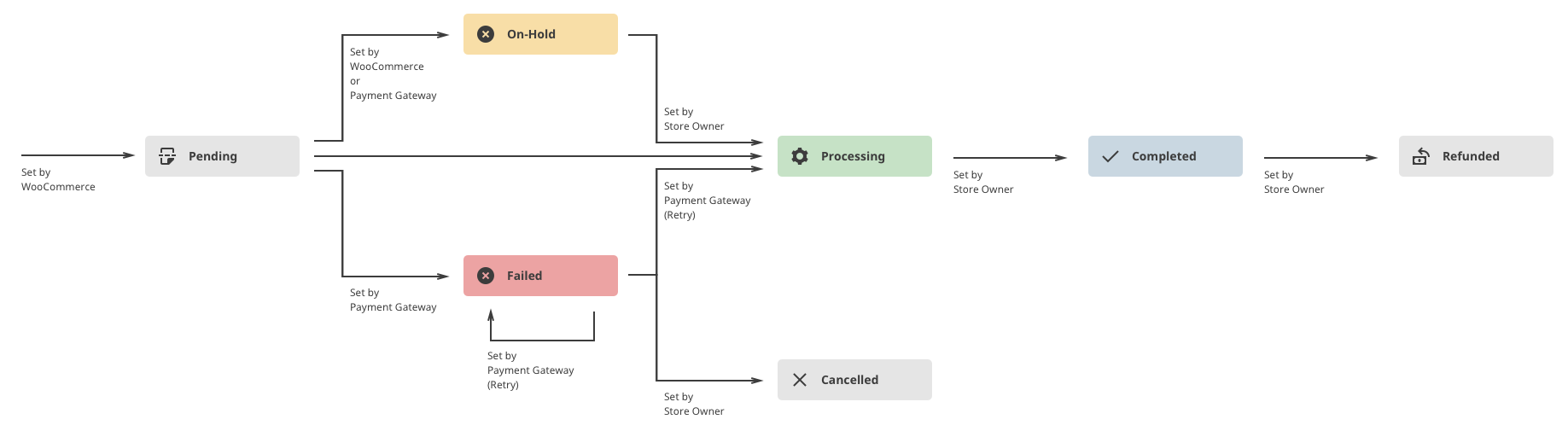
Visual Diagram to Illustrate Order Statuses
This visual representation follows an order through its statuses from “Pending payment” to “Completed”, “Canceled” or “Refunded.”