

This post is to provide customization for Flatsome QuickView
By default Flatsome QuickView is not-able to be customize and it has issue when we want to hide the add to cart button or add to quote button.
By inserting following PHP codes into the Theme Editor under Appearance, and you can customize it to show the elements you want to display in QuickView.
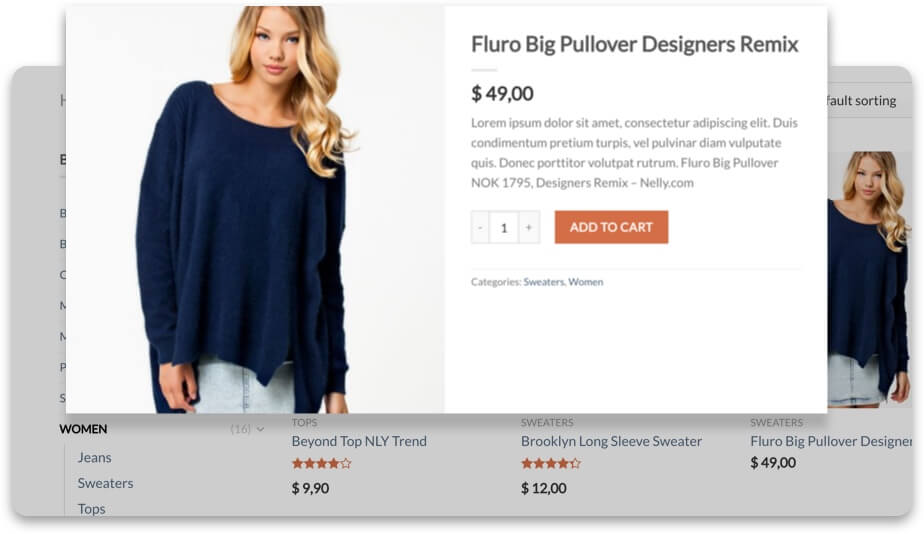
First and Foremost:
Below PHP codes are the default in Flatsome which can be find under:
Flatsome: flatsome-quick-view.php (inc/extensions/flatsome-wc-quick-view/flatsome-quick-view.php)
<?php
/**
* Add Button to Grid Tools
*/
function flatsome_lightbox_button() {
if ( get_theme_mod( ‘disable_quick_view’, 0 ) ) {
return;
}
// Run Quick View Script.
wp_enqueue_script( ‘wc-add-to-cart-variation’ );
global $product;
echo ‘ <a class=”quick-view” data-prod=”‘ . $product->get_id() . ‘” href=”#quick-view”>’ . __( ‘Quick View’, ‘flatsome’ ) . ‘</a>’;
}
add_action( ‘flatsome_product_box_actions’, ‘flatsome_lightbox_button’, 50 );
/* Add stuff to lightbox */
add_action( ‘woocommerce_single_product_lightbox_summary’, ‘woocommerce_template_single_price’, 10 );
add_action( ‘woocommerce_single_product_lightbox_summary’, ‘woocommerce_template_single_excerpt’, 20 );
add_action( ‘woocommerce_single_product_lightbox_summary’, ‘woocommerce_template_single_add_to_cart’, 30 );
add_action( ‘woocommerce_before_single_product_lightbox_summary’, ‘woocommerce_show_product_sale_flash’, 20 );
if ( get_theme_mod( ‘product_info_meta’, 1 ) ) {
add_action( ‘woocommerce_single_product_lightbox_summary’, ‘woocommerce_template_single_meta’, 40 );
}
/**
* Quick View Output
*/
function flatsome_quickview() {
global $post, $product;
$prod_id = $_POST[“product”];
$post = get_post( $prod_id );
$product = wc_get_product( $prod_id );
ob_start();
add_filter( ‘woocommerce_add_to_cart_form_action’, ‘__return_empty_string’ ); // Disable form action that causes redirect.
wc_get_template( ‘content-single-product-lightbox.php’ );
remove_filter( ‘woocommerce_add_to_cart_form_action’, ‘__return_empty_string’ );
$output = ob_get_contents();
ob_end_clean();
echo $output;
die();
}
add_action( ‘wp_ajax_flatsome_quickview’, ‘flatsome_quickview’ );
add_action( ‘wp_ajax_nopriv_flatsome_quickview’, ‘flatsome_quickview’ );
Secondly:
Below PHP codes are the default in Flatsome which can be find under:
Flatsome: content-single-product-lightbox.php (woocommerce/content-single-product-lightbox.php)
<?php
/**
* Quick View
*
* @package Flatsome
*/
defined( ‘ABSPATH’ ) || exit;
global $post, $product;
do_action( ‘wc_quick_view_before_single_product’ );
?>
<div class=”product-quick-view-container”>
<div class=”row row-collapse mb-0 product” id=”product-<?php the_ID(); ?>” <?php post_class(); ?>>
<div class=”product-gallery large-6 col”>
<div class=”slider slider-show-nav product-gallery-slider main-images mb-0″>
<?php if ( has_post_thumbnail() ) :
$image_title = esc_attr( get_the_title( get_post_thumbnail_id() ) );
$image_link = wp_get_attachment_url( get_post_thumbnail_id() );
$image = get_the_post_thumbnail( $post->ID, apply_filters( ‘woocommerce_gallery_image_size’, ‘woocommerce_single’ ), array(
‘title’ => $image_title,
) );
echo apply_filters( ‘woocommerce_single_product_image_thumbnail_html’, sprintf( ‘<div class=”slide first”>%s</div>’, $image ), $post->ID ); // phpcs:disable WordPress.XSS.EscapeOutput.OutputNotEscaped
// Additional images.
$attachment_ids = $product->get_gallery_image_ids();
if ( $attachment_ids ) {
$loop = 0;
$columns = apply_filters( ‘woocommerce_product_thumbnails_columns’, 3 );
foreach ( $attachment_ids as $attachment_id ) {
$image_title = esc_attr( get_the_title( $attachment_id ) );
$image = wp_get_attachment_image( $attachment_id, apply_filters( ‘woocommerce_gallery_image_size’, ‘woocommerce_single’ ), array(
‘title’ => $image_title,
‘alt’ => $image_title,
) );
echo apply_filters( ‘woocommerce_single_product_image_thumbnail_html’, sprintf( ‘<div class=”slide”>%s</div>’, $image ), $attachment_id ); // phpcs:disable WordPress.XSS.EscapeOutput.OutputNotEscaped
}
};
else :
echo apply_filters( ‘woocommerce_single_product_image_thumbnail_html’, sprintf( ‘<img src=”%s” alt=”%s” />’, wc_placeholder_img_src( ‘woocommerce_single’ ), esc_html__( ‘Awaiting product image’, ‘woocommerce’ ) ), $post->ID ); // phpcs:disable WordPress.XSS.EscapeOutput.OutputNotEscaped
endif;
?>
</div>
<?php do_action( ‘woocommerce_before_single_product_lightbox_summary’ ); ?>
</div>
<div class=”product-info summary large-6 col entry-summary” style=”font-size:90%;”>
<div class=”product-lightbox-inner” style=”padding: 30px;”>
<a class=”plain” href=”<?php the_permalink(); ?>”><h1><?php the_title(); ?></h1></a>
<div class=”is-divider small”></div>
<?php do_action( ‘woocommerce_single_product_lightbox_summary’ ); ?>
</div>
</div>
</div>
</div>
<?php do_action( ‘wc_quick_view_after_single_product’ ); ?>
As we all know:
The highlighted parts are the content of the product which will be included in QuickView. By modifying this using remove_action or add_action and we can hide or display content based on desired condition.
Example 1 (Hide AddToCart button for certain category):
add_action( 'woocommerce_single_product_lightbox_summary', 'hide_add_to_cart_for_used_cars', 10 );
function hide_add_to_cart_for_used_cars() {
remove_action( 'woocommerce_single_product_lightbox_summary', 'woocommerce_template_single_add_to_cart', 30 );
global $product;
$product_cats = wp_get_post_terms($product->id, 'product_cat');
if ($product_cats[1]->slug != 'used-cars') {
add_action( 'woocommerce_single_product_lightbox_summary', 'woocommerce_template_single_add_to_cart', 40 );
}
}
** In this case, you are required to adjust the priority appropriately:
default => 10
remove => greater than default eg. 30
add => greater than remove eg.40
** Remove_action must be declared within a function, cannot place directly in theme editor or plugin editor
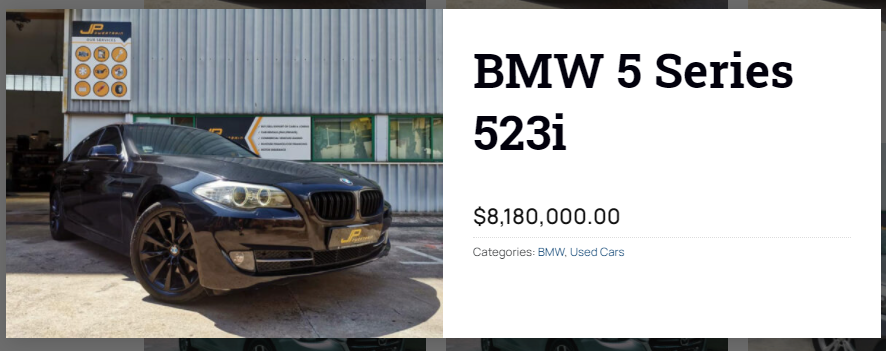
AddToCart button is not rendering out, which means it has been ‘hid’ or ‘removed’
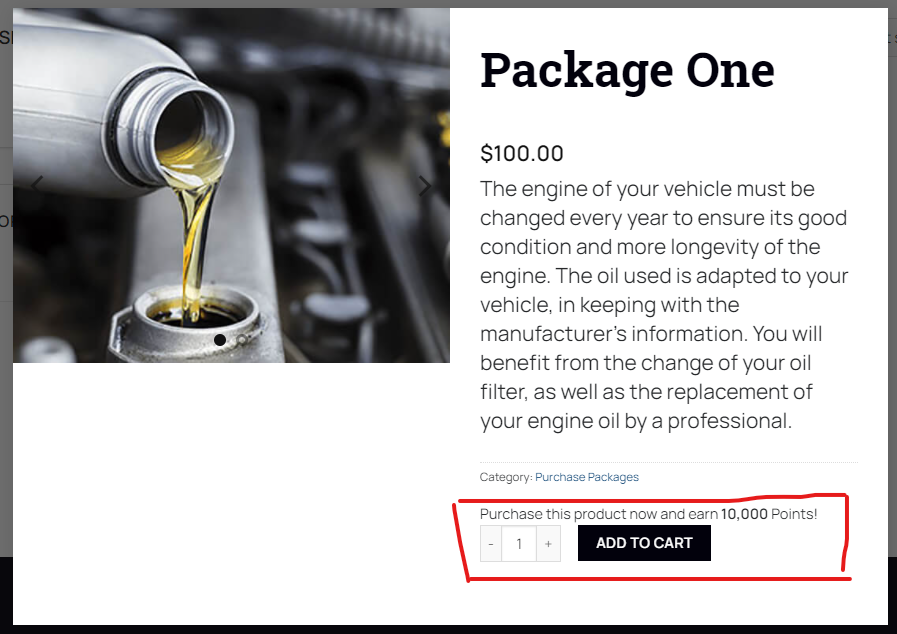
AddToCart button is rendering out for other categories, the codes would not affect other categories
** You are required to discover the condition you want before doing the conditional statement
Published by: Moses
If there is any other better way please let me know