

READ THIS BEFORE START
Enquiry Form with Placeholder
Enquiry Form without Placeholder
Ask For Quote
Appointment Form
Membership form
Product Warranty
Newsletter
Career Submission Form
Manual Order Form
Complex Feedback Form
READ THIS BEFORE START
Refer to the Highlighted Box – Most important thing to take note too.
*How to test? Just key in your email & project manager’s email to test the form. After all is confirmed, you can revert it back to the client’s email.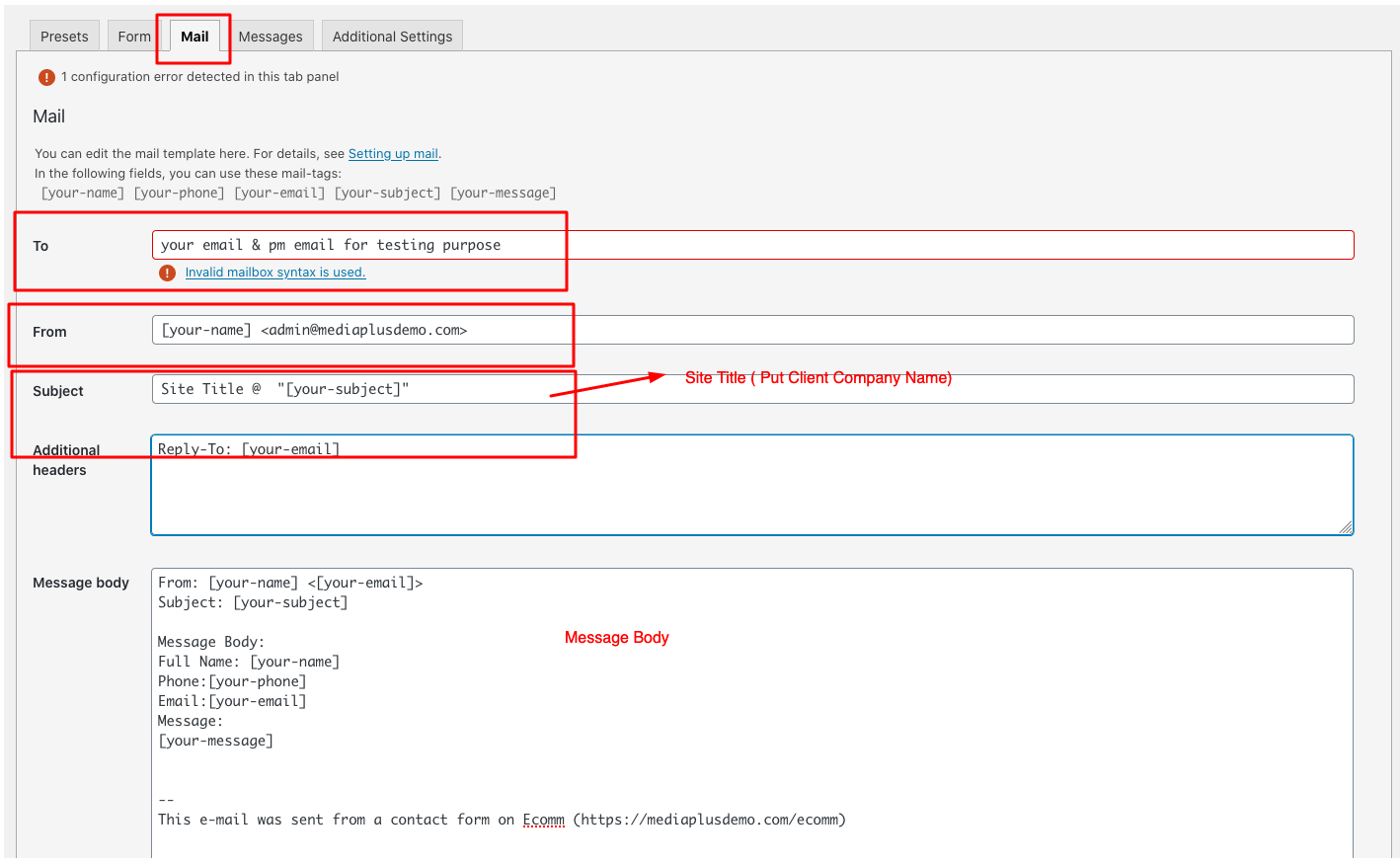
If you need to have confirmation email to your client –
Here is the screenshot you need to read.
Last – if you have the field is for attached file.
( Please note on the limited File size & File type )
Important is put the code into correct column. Please refer to the below screenshot :
Enquiry Form with Placeholder
Enquiry Form without Placeholder
Ask For Quote
Appointment Form
Membership form
Product Warranty
Newsletter
Career Submission Form
Manual Order Form
Complex Feedback Form